 WebKeeper
Free 30-day trial for agencies & freelancers
Know when a client site needs you.
WebKeeper keeps watch over the websites and domains you look after: uptime and response times, certificates, domain expiry and DNS changes, with a daily screenshot of every site. It tells you by email when something needs you, and keeps who’s responsible right beside each site.
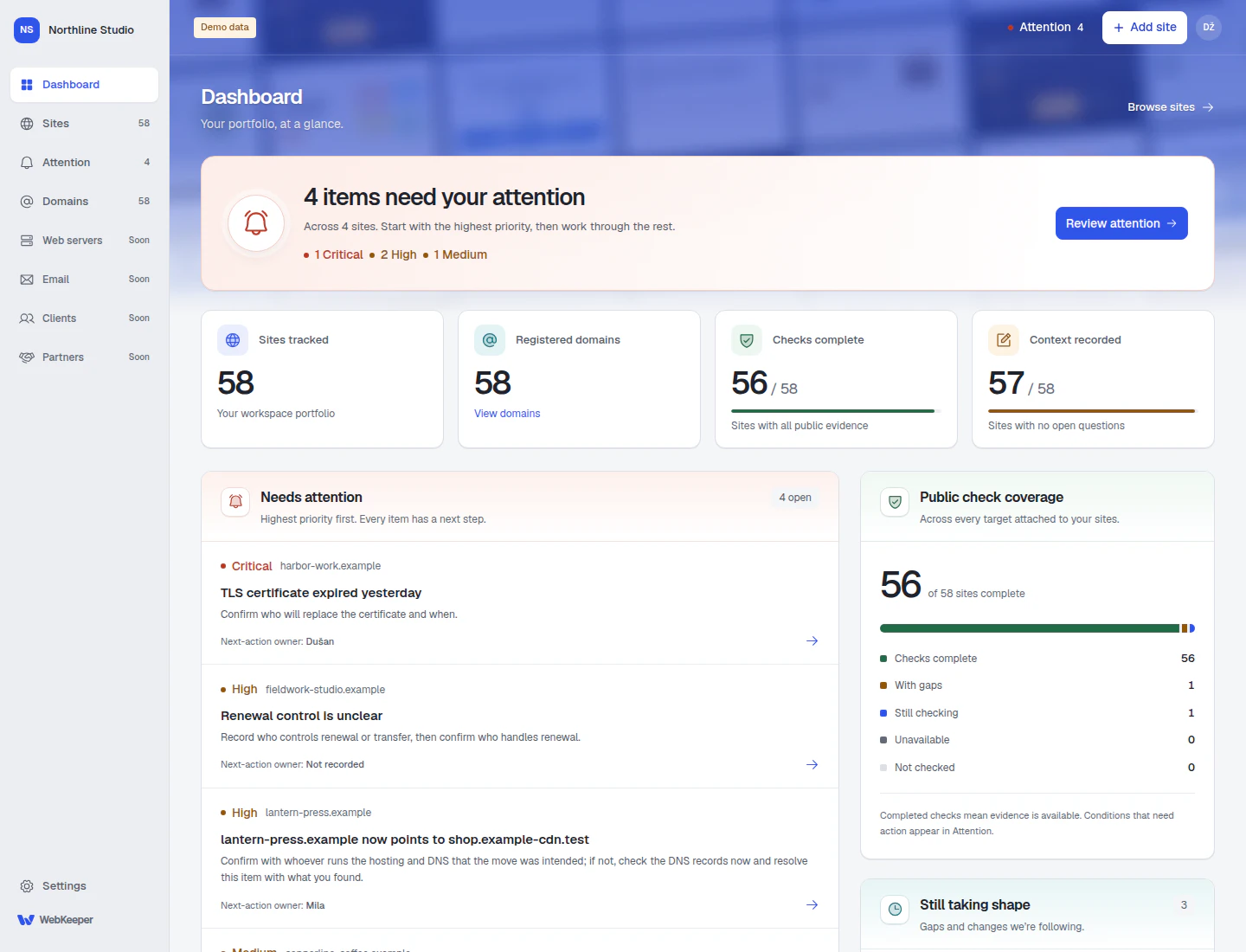
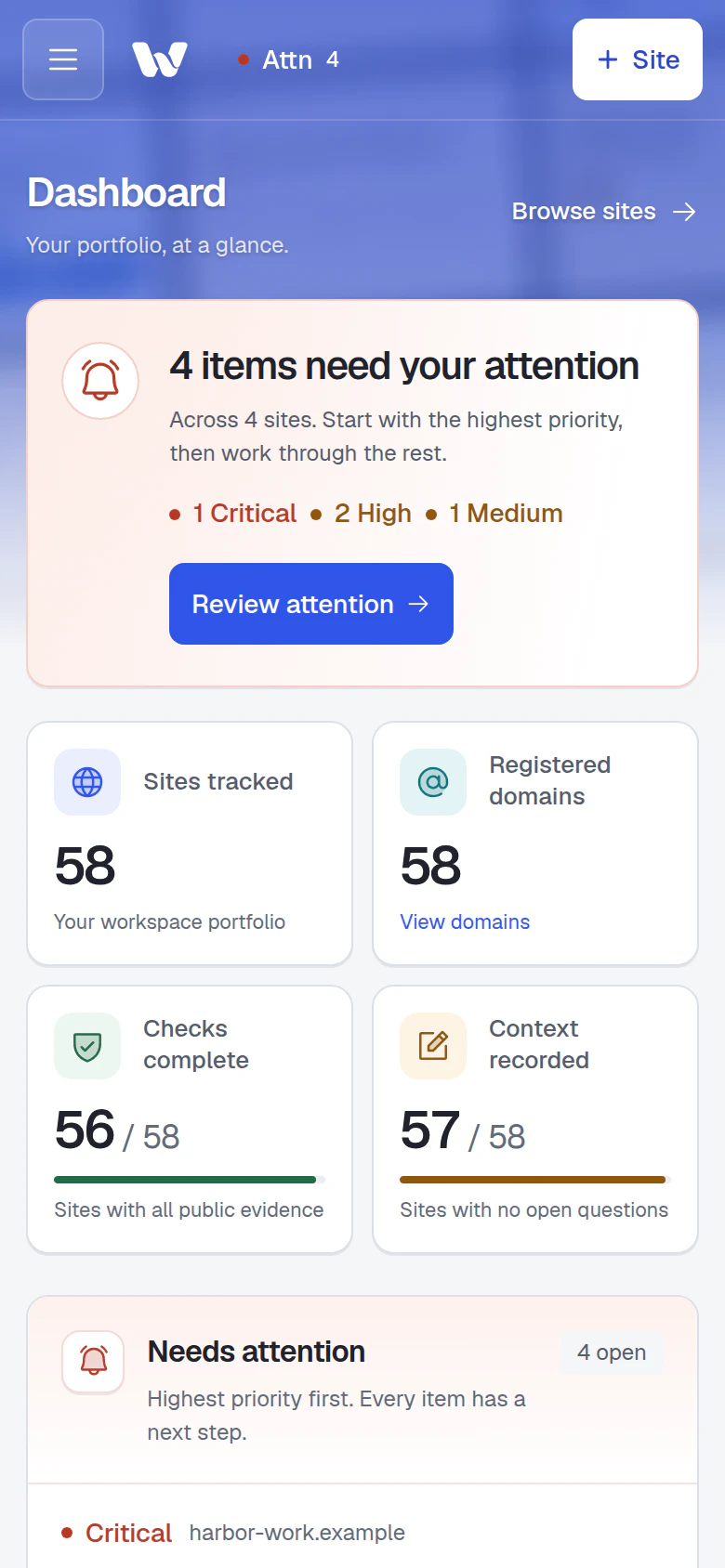
Real product screens. Fictional businesses and demo data.
Paste a list of domains to start
No plugins, agents or provider logins
One shared view for your whole team
The site is in one dashboard.
The answer is in someone’s head.
A registrar login here. A client spreadsheet there. That one colleague who remembers the arrangement. WebKeeper gives that knowledge a shared home, with current evidence beside it.
- “Is this still our responsibility?”
- “Who has the registrar account?”
- “Did anyone change the DNS?”
Monitoring
Every site at a glance.
Every response on record.
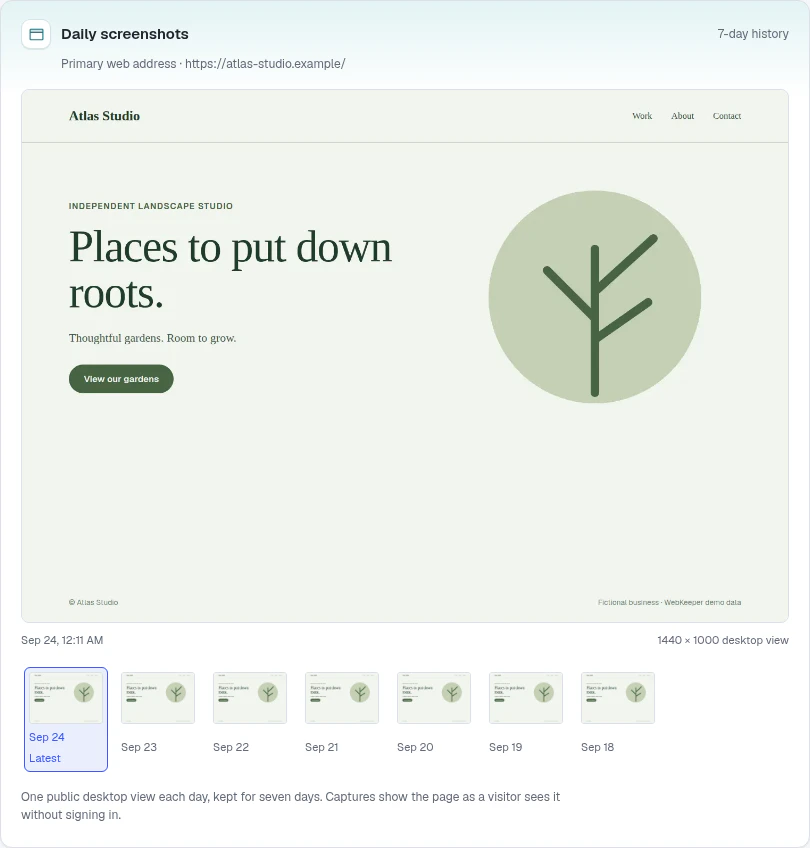
See the whole portfolio as it looks today: the latest screenshot and a day of response times for each site. Open one for 30 days of history and a week of daily screenshots.
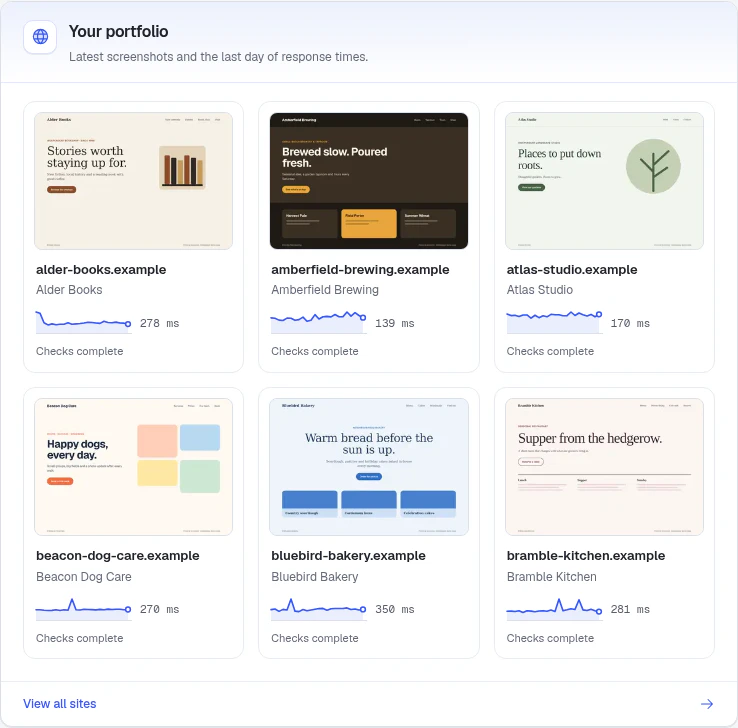
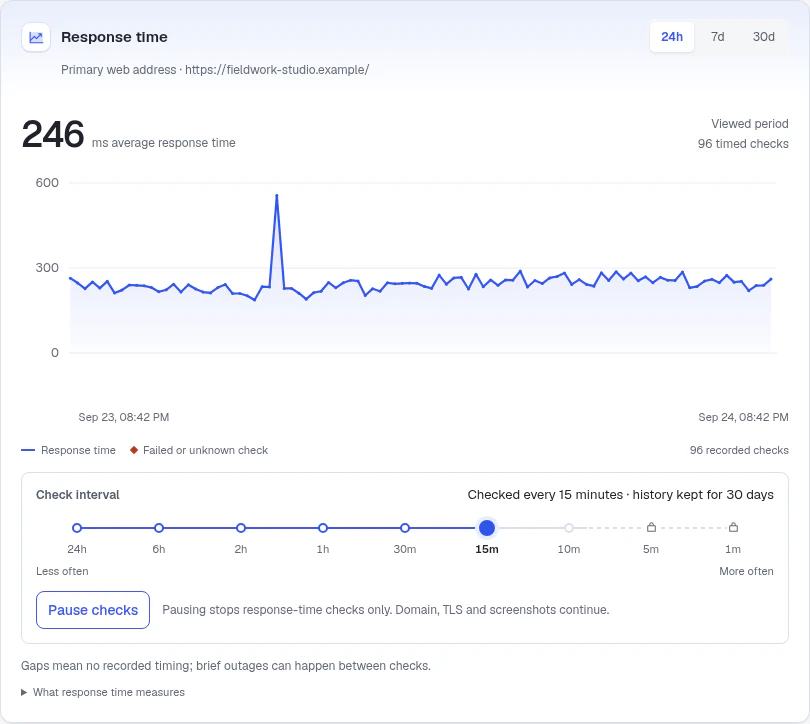
- Hourly, or every minute
- Pick each site’s check interval. Faster checks come with Business and First Class.
- 30 days of history
- Response times and failed checks over 24 hours, 7 or 30 days.
- A daily screenshot
- See how each landing page looked on each of the last seven days.
- Pause for planned work
- Pausing stops website checks only. Domain, certificate and screenshot checks carry on.
Attention
One short list of what needs you.
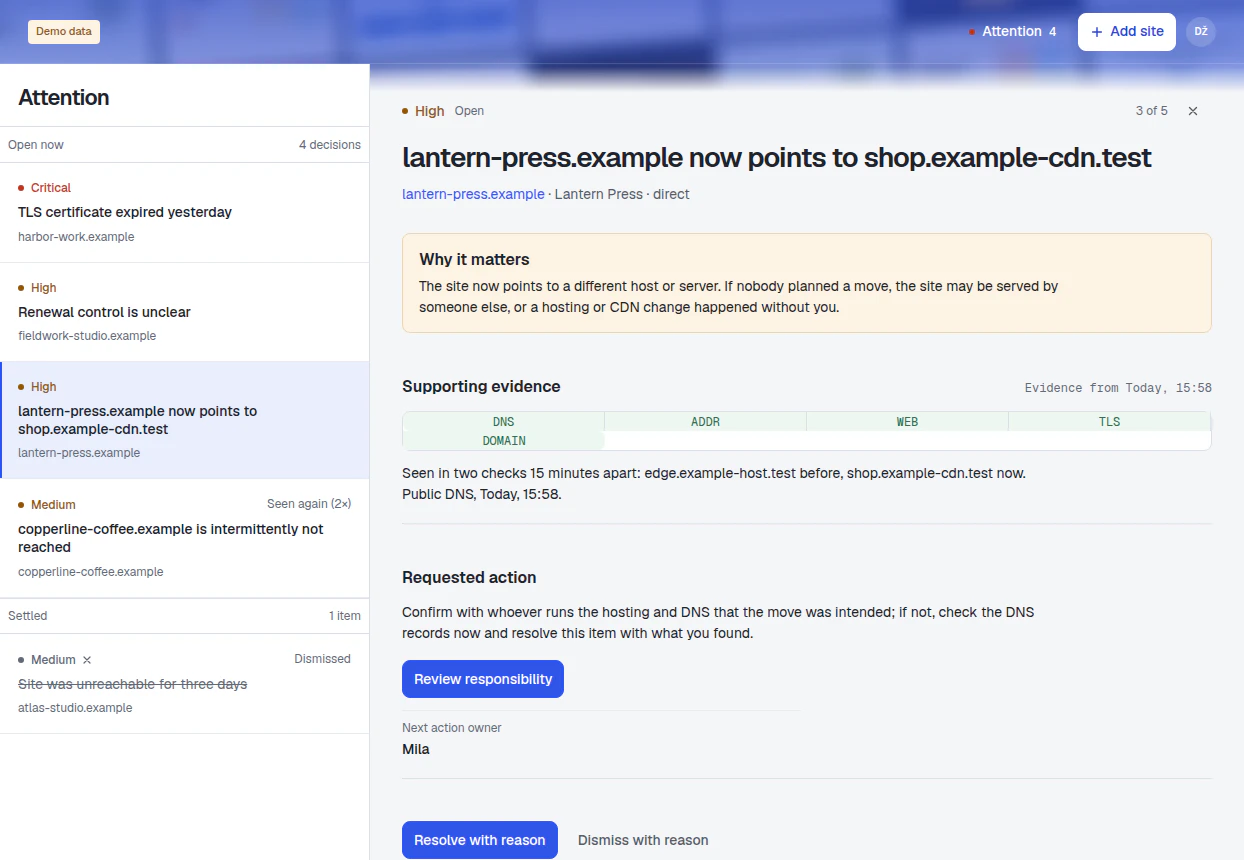
Open WebKeeper to the few things that need a decision, ordered by severity. Each one explains what was seen, why it matters and who should act.
- A site stops answering. A failed check or a server error opens an item at once and settles when the site answers again.
- A site moves. A nameserver or registrar change, or a redirect that now ends on another domain, shows up when first seen and a later check confirms it. A move to a new server or CDN is reported once a second check agrees.
- Something is about to expire. Certificates and domain registrations, well before the date.
Alerts by email on every plan. Slack, Mattermost and webhooks on Business and First Class.
Responsibility
Make “who owns this?” a quick answer.
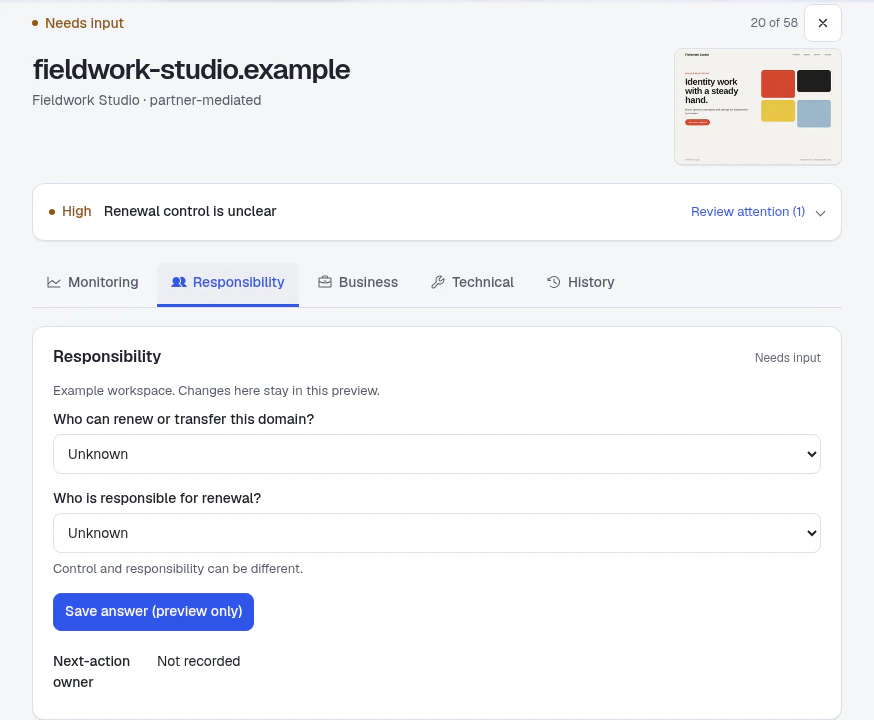
The client, the person with registrar access and the person handling renewal can all be different people. Record each answer separately, so your team knows who to ask and who should act.
Invite your team into the same workspace, set shared defaults and keep unanswered questions visible until someone confirms them.
Technical detail
The technical details, in the client’s context.
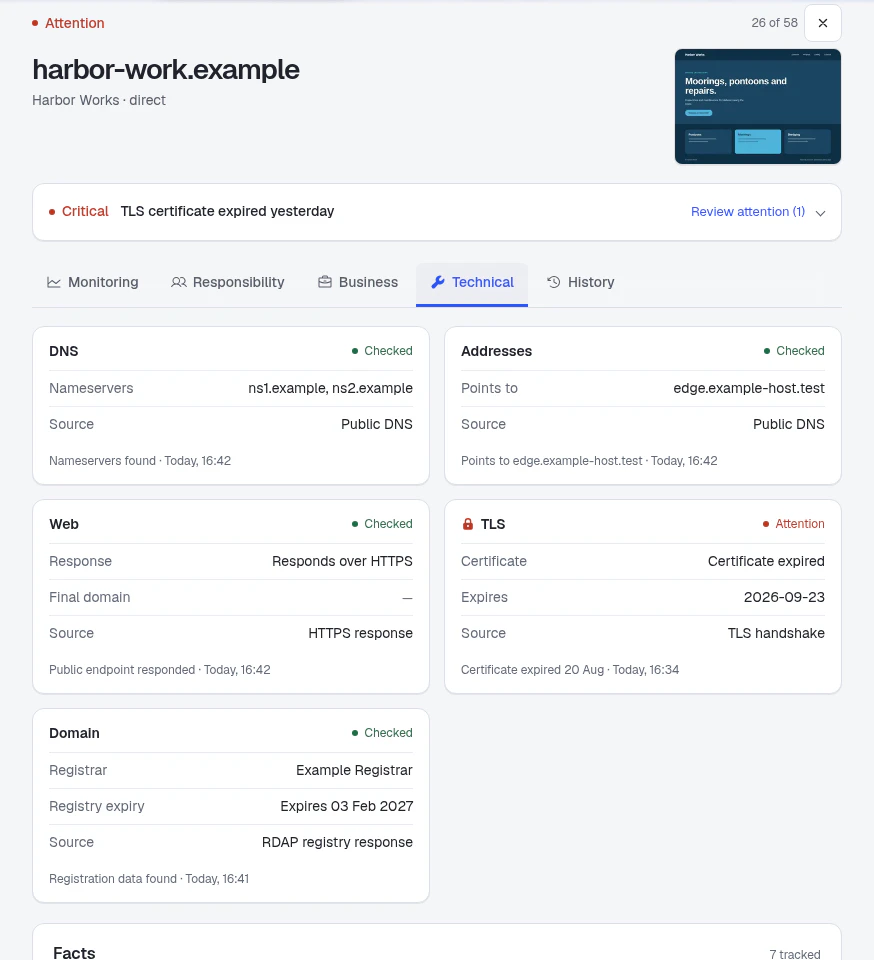
Where a site points, which DNS provider answers, when the certificate and registration run out. Every observation comes with a source and a time, and anything unknown stays clearly marked.
Useful for a routine review, a handover or finding out what changed.
Plans & pricing
One plan covers your sites, domains, certificates and who’s responsible.
Every plan includes website, domain, certificate and mail-record checks, a daily screenshot of each site, one list of what needs a decision with email alerts, and a shared record of who is responsible for what. Plans differ in how many sites and people they hold, how often websites are checked, and whether alerts can also reach Slack, Mattermost and your own tools.
What every plan includes
Website monitoring
Each site’s main address is checked on a schedule, with 30 days of response times and failed checks, and a desktop screenshot every day for the last seven days. Pause the website checks during planned work; the domain and certificate checks carry on.
When it matters: A client says the site was slow on Tuesday. Open the week’s chart and see what the checks recorded that day, and when.
Domains, DNS and certificates
Registry expiry where the registry publishes it, the registrar, the nameservers and who runs them, the servers or CDN each address points to, and every certificate’s validity and expiry. Each fact comes with its source and time, and anything unknown says so.
When it matters: A certificate has 30 days left. It appears on your list, becomes urgent at seven days, and is critical if it expires. A site quietly moves to a new host: once a second check agrees, one item says where it went and asks whether that was intended.
Attention and notifications
One list of what needs a decision, ordered by severity. Each item says what was seen, why it matters and what to do next. A site that stops answering is reported at the check that finds it down, and again at the check that finds it back. Everyone on the team who wants them gets email alerts and a daily summary at 08:00 in their own time zone, on the days there is something to say. Business and First Class also post to Slack or Mattermost and to your own tools.
When it matters: A client site goes down at 2 a.m. The check that finds it sends the alert to everyone who asked for one; the recovery message comes from the check that finds it answering.
Who is responsible
For each site, record who it is for and how you work with them, who controls the domain account, who handles renewal, and which teammate takes the next action. Set defaults for the whole portfolio and note the exceptions. Any answer can stay unknown, and the checks run the same. These records are for your team; nothing is sent to clients.
When it matters: The registry says a domain expires in 14 days, and it was registered by the client’s previous developer. Domains shows who can renew it, or that nobody knows yet, which is the first thing to fix.
Email
Each domain’s mail records are checked every six hours: who receives its mail, which servers may send it, what happens to mail that fails, and the signing keys you name, checked daily. Changes and breakage reach the same list as everything else.
Coming When a message does not arrive, a report from the original message or its headers that says what passed, what failed, what could not be checked and what to change.
When it matters: A client moves to a new mail provider and nobody updates the sending policy. The next check reports that the new servers are not allowed to send, before the bounces start.
WebKeeper checks configuration and authentication. It cannot see inside a receiver’s spam filter and never promises inbox placement.
Economy
For one person or a small studio.
$19/monthFounding price · planned standard $39/month
$190/year, 2 months free
Website, domain, certificate and mail-record monitoring for a smaller portfolio, with email alerts for your team.
- 25 active sites
- 50 tracked addresses
- 3 members, including you
Every site checked hourly
Every trial starts here.
Business
For an agency with a team.
$49/monthFounding price · planned standard $69/month
$490/year, 2 months free
Faster checks on the sites that matter most, and alerts in the team’s Slack channel.
- 100 active sites
- 200 tracked addresses
- 5 members
Up to 10 sites you choose checked every 10 minutes; the rest hourly
Slack, Mattermost and webhooks
First Class
For a large portfolio.
$99/monthFounding price · planned standard $129/month
$990/year, 2 months free
Minute-by-minute checks on the sites you choose, and room for 250.
- 250 active sites
- 500 tracked addresses
- 10 members
Up to 50 sites you choose checked every minute; the rest hourly
Slack, Mattermost and webhooks
Prices are in US dollars per workspace and include tax. Pay monthly or yearly and cancel from the app; cancellation takes effect at the end of the paid period. Start with a free 30-day Economy trial; no credit card needed. Founding prices are for early customers: subscribe while they are offered and keep them for as long as you stay subscribed, including when you change plan or switch between monthly and yearly. The planned standard prices apply to customers who join later.
A site is a website you look after. Tracked addresses are the domains and URLs recorded against your sites; website checks run on each site’s primary address, and domain and certificate checks cover every tracked address.
Compare plans
| Capability | Economy | Business | First Class |
|---|---|---|---|
| Portfolio | |||
| Active sites | 25 | 100 | 250 |
| Tracked addresses | 50 | 200 | 500 |
| Members, including you | 3 | 5 | 10 |
| Website monitoring | |||
| Check interval | Every hour | Down to every 10 minutes | Down to every minute |
| Sites that can use the faster interval | Not included | 10 | 50 |
| Response history | 30 days | 30 days | 30 days |
| Daily screenshots | 7 days | 7 days | 7 days |
| Pause checks for planned work | Included | Included | Included |
| Domains and certificates | |||
| Registry expiry, registrar, nameservers, where each address points | Included | Included | Included |
| Certificate validity and expiry | Included | Included | Included |
| Change history with source and time | Included | Included | Included |
| Check again on demand | Included | Included | Included |
| Attention and notifications | |||
| Attention list in the app | Included | Included | Included |
| Email alerts and daily summary, for every member | Included | Included | Included |
| Extra team email addresses | Included | Included | Included |
| Slack and Mattermost channel | Not included | Included | Included |
| Webhooks to your own tools | Not included | Included | Included |
| Who is responsible | |||
| Per-site client, partner and responsibility records | Included | Included | Included |
| Portfolio defaults and exceptions | Included | Included | Included |
| Mail record checks every six hours | Included | Included | Included |
| Message diagnosis (coming) | Included on release | Included on release | Included on release |
Faster checks apply to the sites you choose; the rest stay hourly. Moving to a smaller plan pauses Slack, Mattermost and webhook delivery and keeps their settings. If the smaller plan holds fewer sites or addresses than you track, you have 14 days to archive what you choose; after that the oldest sites are archived for you, with their records kept and restorable.
Getting started
From a list of domains to a shared picture.
- 1
Paste your sites
Domains, URLs or a column from your spreadsheet. Review before adding.
- 2
Watch the checks arrive
DNS, website, certificate and domain results land within minutes.
- 3
Add who’s responsible, if it helps
Client, domain control, renewal and next-action owner. Optional, and you can leave anything unknown.
- 4
Work the list
Resolve or dismiss each item with a reason your team can see.
A website launch is a milestone. Looking after the domain, remembering the arrangements and handing it over clearly is ongoing work. That is the work I’m building WebKeeper for.
Dušan, founder · hello@webkeeper.io
A few things
you might be wondering.
Something else on your mind?
Get in touch.

A 30-day trial with your real client portfolio.
Every client site.
One shared picture.
Free for 30 days. Up to 25 sites and three people, including you.
No credit card needed. How signup works.